 Seolytics
Competitor Keyword Research: How to Find Your Competitors' Keywords
How to find the keywords your competitors rank for, spot the gaps worth chasing and turn them into pages, step by step and with free methods.

Competitor keyword research means finding the searches that bring your competitors traffic and choosing the ones you can win. Pick three to five sites that rank for your main topics and list the keywords that send them the most visits. Filter the list by intent and difficulty, then look for gaps: searches where they rank and you don't, or where they rank with a weak page. Each gap you keep turns into a new page or an improved existing one.
It is the quickest way to build a keyword list, since your competitors have already found out which topics bring traffic.
How to identify competitors
The sites you compete with in Google are often not your business competitors. A local bakery competes with the shop down the street for customers, but in search results it is up against recipe sites and food magazines. To find the sites that actually rank:
- Write down 10 to 20 keywords that describe what you sell or write about.
- Search for each one in a private window, set to the country you target.
- Note the domains in the top 10. The ones that keep appearing across your keywords are your search competitors.
- Leave out Wikipedia, Amazon, YouTube and Reddit unless your site is the same kind of site. Their rankings come from their size, and you can't copy that.
- Check how big each competitor is with a website traffic checker. Sites a few times larger than yours teach you the most. One that is a hundred times bigger is playing a different game.
AI answers give you a second list: the sites ChatGPT or Google's AI Overviews cite when people ask about your topic. They often differ from the sites ranked first, and you can study them the same way.
How can I identify competitor keywords?
With the competitors chosen, pull their keywords and narrow the list down:
- Get the keywords that bring each competitor the most traffic. Sort by estimated traffic rather than search volume, because a keyword where they rank first is worth more to them than a bigger one where they rank 40th. Our free competitor keyword finder shows a domain's top 25 keywords by traffic.
- Note the position and the URL that ranks. The URL shows what type of content wins for that search: a guide, a tool, a comparison or a product page.
- Keep the searches whose intent matches what you can offer. Informational searches suit articles, commercial ones suit comparisons, and transactional ones suit product pages.
- If your site is new or small, start with keywords that have a difficulty under about 30 on a 0–100 scale.
- Remove the keywords you already rank well for. What's left is the gap.
- Group the keywords one page can answer, and decide for each group whether it needs a new page or an update to an existing one.
Here is what each column in a keyword report tells you:
| Column | What it tells you |
|---|---|
| Keyword | What people type |
| Search volume | How many searches a month, so how big the opportunity is |
| Difficulty (KD) | How hard it is to get into the top 10 |
| Position | How firmly the competitor holds the keyword |
| Ranking URL | What kind of page wins |
| Intent | What the searcher wants: to learn, compare, buy or reach a specific site |
| Estimated traffic | How much the keyword is worth to the competitor |
The keyword gap: what they rank for and you don't
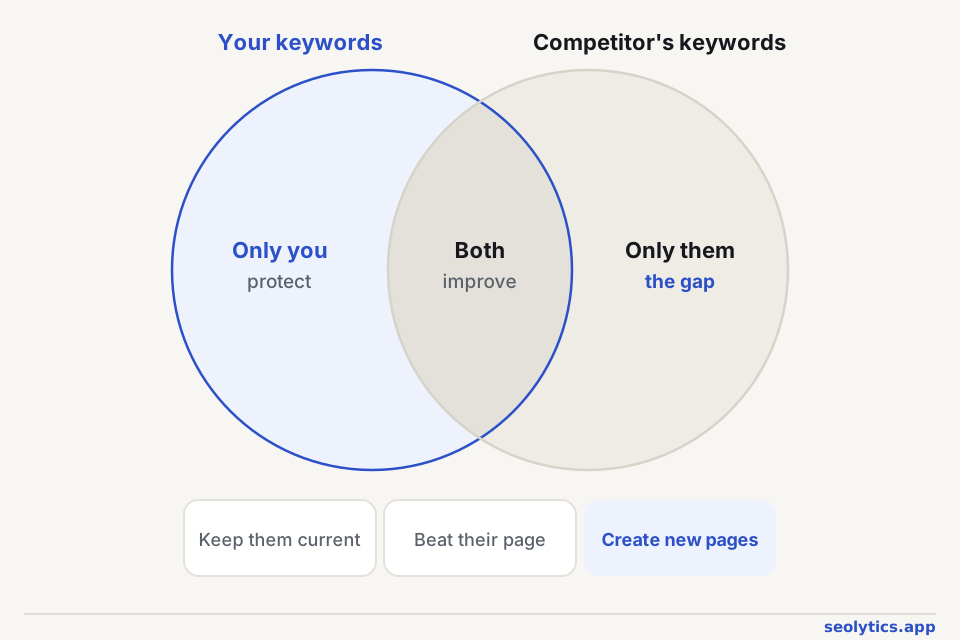
Put your keywords next to a competitor's and they fall into three groups. Keywords only you rank for are pages to keep current. Keywords you both rank for are worth a side-by-side comparison when they're ahead: answer more directly than they do and add what their page has and yours lacks. Keywords only they rank for are the gap. The demand there is proven, so these tell you which pages to write next.
How to find keywords with low competition
A low difficulty score is a start, but look at the pages that rank right now. If the top 10 has forum threads, thin pages, outdated articles or pages that don't really answer the question, Google is short of a good answer and a better page has a chance.
Longer, more specific searches have less volume and far less competition. They are also the kind of searches AI assistants run when they split a question into parts.
It also pays to check other phrasings of the same topic. One of them may have similar demand and much lower difficulty. We found one while researching this blog: our comparison article first targeted "seo vs geo vs aeo", with 390 searches a month and a difficulty of 17. "geo vs seo" turned out to have 2,900 searches and a difficulty of 9, so we renamed the article "GEO vs SEO vs AEO". The page stayed the same, and its main keyword now has about seven times the demand.
What is the best way to find keywords?
Use several sources, because each one finds keywords the others miss:
- Your own Google Search Console. The Performance report shows the queries you already get impressions for; look especially at those where you rank between 8 and 20.
- Competitors' keywords, found with the steps above.
- A keyword generator, which expands a seed topic into related searches with volume and difficulty. Our free keyword generator returns up to 30 ideas per topic.
- Google itself. Autocomplete, People Also Ask and related searches show the questions behind a topic, and our article on People Also Ask explains how to use them.
Free ways to see competitor keywords
Search Google with site:competitor.com topic to see which of their pages Google has for a topic. Their sitemap and navigation show how they organize their content. For numbers, the competitor keyword finder, website traffic checker and keyword generator work without signing up.
For a competitor's full keyword list and a direct comparison with yours, the Seolytics app saves the results to a project and shows the keywords they rank for and you don't.
Turn the research into pages
Searches that want the same answer belong on one page, and searches with different intent need separate pages. If you already have a page on the topic ranking somewhere between 11 and 30, improving it is usually faster than writing a new one.
Before writing, read the top three results. Cover what they cover, then add what they're missing, such as newer data, clearer steps or real examples. When the page is live, link to it from related pages on your site so search engines find it quickly.
FAQ
How many competitors should I analyze?
Three to five is enough for most sites. After that the same keywords keep repeating. Check every few months which sites rank for your topics, because search competitors change.
How often should I do competitor keyword research?
Do a full review every three to six months and a quick check before planning new content. Pay attention to competitors' new pages that start ranking, since they point to topics with growing demand.
Is competitor keyword research the same as a keyword gap analysis?
They overlap. Competitor keyword research looks at what a competitor ranks for. A keyword gap analysis compares that list with yours and keeps only the keywords you're missing, which is usually the most useful part of the research.
Can I find a competitor's keywords for free?
Yes, up to a point. Free lookups show a competitor's top keywords by traffic, and Google shows which of their pages exist for a topic. Full keyword lists, history and side-by-side comparisons generally need a paid tool.